Multi-Calendar Intent Routing for Insurance Agents
Multi-calendar intent routing books ACA, Medicare, and dental leads onto separate calendars, keeping every Medicare appointment inside its CMS scope.
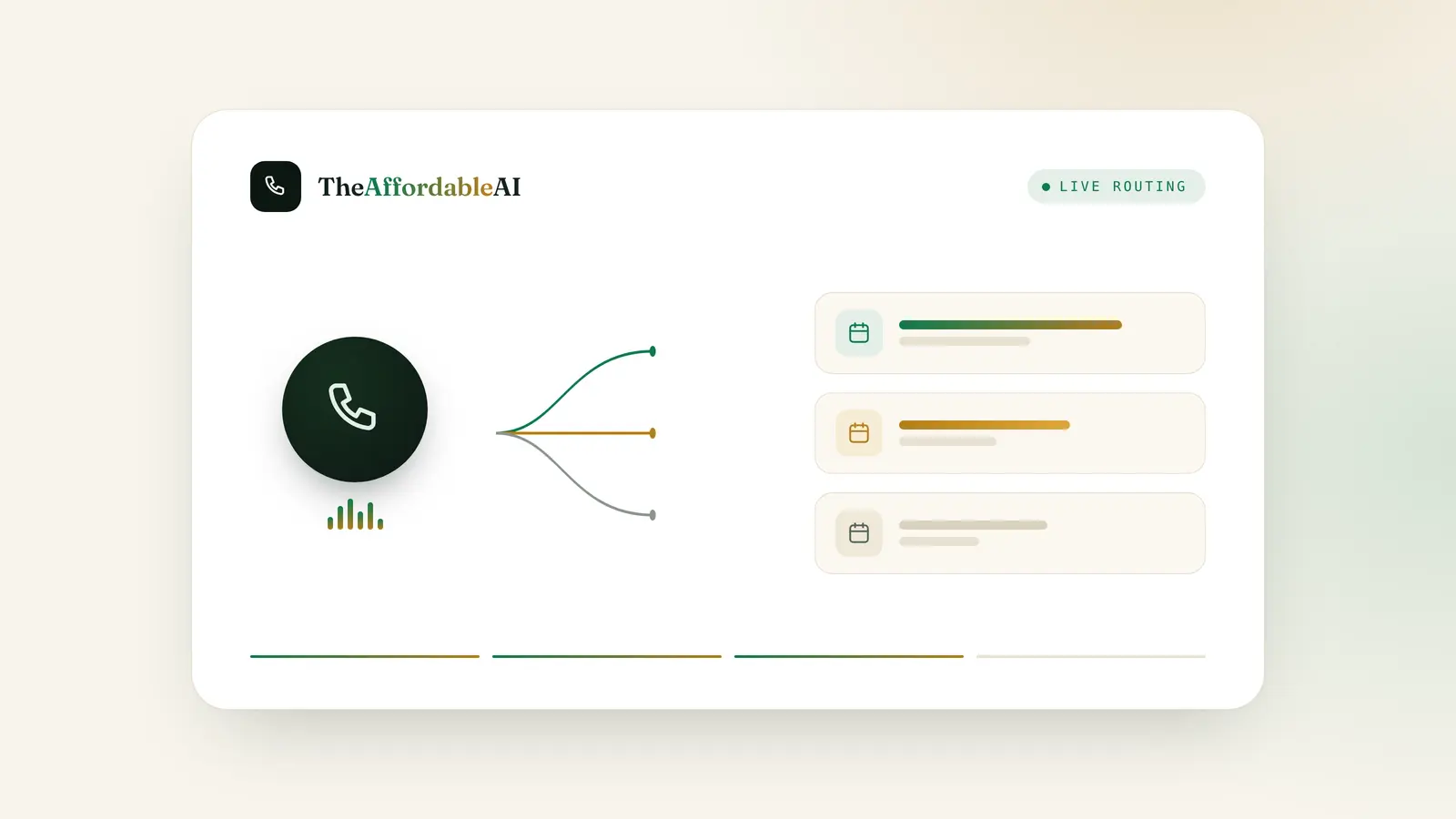
Multi-calendar intent routing is the practice of booking a lead onto the calendar built for the product they actually need, ACA to an ACA calendar, Medicare to a Medicare calendar, dental to its own, decided by what the caller wants rather than funneled through one shared booking link for the whole agency. Most agencies that sell more than one product line are still running a single calendar, or one calendar per producer instead of one per product, which means the thing that decides whether a Tuesday-at-2pm slot gets booked correctly has nothing to do with what the lead actually came in for. If you’ve ever had a Medicare appointment show up on a calendar meant for ACA renewals, or a producer discover mid-call that the meeting on their screen isn’t the conversation they’re about to have, you’ve already met this problem, whether or not you had a name for it.
Key takeaways
- Multi-calendar intent routing books a lead to the calendar built for their product (ACA, Medicare, dental, and so on), decided by intent, before availability is ever checked. It's a different decision than round-robin or skill-based agent assignment, which happens after.
- GoHighLevel natively supports this through Group Calendars, a container that organizes multiple individual calendars by department, availability, or service, per HighLevel's own support documentation.
- For Medicare specifically, the calendar a lead lands on isn't just an operations detail. CMS's Medicare Communications and Marketing Guidelines require a Scope of Appointment to list the product types to be discussed, and a new Scope of Appointment if the beneficiary asks about a different plan type mid-appointment.
- The real cost of a misrouted calendar isn't the ten minutes it takes to reschedule. It's a producer's time, at a median $29.94 an hour per the Bureau of Labor Statistics, spent sorting out a mismatch that intent-based routing is built to prevent.
- TheAffordableAI's own how-it-works page describes the same mechanic: intent detected, matched calendar checked, warm transfer or auto-booked, at $0.20 a minute on a Single Account plan.
What Multi-Calendar Intent Routing Actually Means
Multi-calendar intent routing answers one question before anything else happens: which calendar does this appointment belong on? Most CRMs, GoHighLevel included, let you build as many individual calendars as you want. The gap almost every multi-line agency has isn’t the absence of calendars, it’s that nobody connected “what does this lead need” to “which calendar gets checked for an open slot.” Three terms are worth defining precisely, because they get used loosely and they’re not the same thing.
Intent detection is identifying what product or service a lead wants, drawn from the lead source, answers given earlier in the call or form, or the specific plan type a lead named. It’s a classification step, not a routing step.
A calendar group, in GoHighLevel’s terms, is a container that bundles multiple individual calendars under one link. Per HighLevel’s own Group Calendar Overview and Setup Guide, “a Group Calendar is a container that groups multiple individual calendars under one link,” organized by department, availability, or service, letting whoever’s booking (a person, or a workflow) choose between team members or services. You build the individual calendars first; the group is the layer that organizes them.
Round-robin distribution is a separate mechanism that decides which team member, inside a calendar, gets the next booking. HighLevel’s Appointment Distribution Logic article describes two modes: “Optimize for Availability,” which assigns to whoever is free at the requested time, and “Optimize for Equal Distribution,” which balances bookings across a rolling one-month window and caps the gap between producers at three appointments before temporarily hiding the leader’s availability. Round-robin answers “which person.” Multi-calendar intent routing answers “which calendar.” An agency can have an excellent round-robin vs. skill-based routing setup running inside entirely the wrong calendar, and the lead still ends up in front of a producer who sells a different product than the one they called about.
Why this is a CRM & Integrations problem, not just an operations one
The calendar a lead lands on is a data object your CRM treats like any other field: it has an owner, a product tag, availability rules, and a sync target. Getting multi-calendar routing right is a workflow-and-integration build, not a whiteboard exercise, which is why it lives in the same toolset as your round-robin and your HighLevel sync, not off to the side as a scheduling preference.
Why One Shared Calendar Breaks Down
A single shared calendar works fine for an agency that sells one product to one list. It stops working the moment a second product line, or a second licensed line of authority, enters the intake process, usually when a producer is dual-licensed in Medicare and ACA, or an agency adds dental or final expense as an upsell and routes the leads through the same booking link out of convenience.
What actually happens
- A Medicare lead and an ACA lead both land on the same booking link, differentiated only by a note field someone has to remember to read.
- Availability reflects the whole team's calendar, not which producers are actually licensed or trained for the product the lead needs.
- Nothing stops a lead from being booked at a time slot meant for a different product's workflow, so the producer finds out what the call is actually about when it starts.
- Rescheduling onto the "right" calendar after the fact becomes a manual, unrecorded step that eats producer time and has no audit trail.
What changes
- Intent is read first, from the lead source, the script, or the stated need, and the booking is checked against the calendar built for that product.
- Availability reflects only the producers actually assigned to that product's calendar group.
- A Medicare appointment lands with a Medicare-ready producer on a Medicare-tagged slot, with the scope of what's being discussed already implied by which calendar it's on.
- Round-robin or skill-based distribution still runs, but inside the correct calendar, so the fairness logic and the product match aren't fighting each other.
What a Misrouted Calendar Actually Costs
There’s no published industry figure for “cost of a misrouted appointment,” and this piece won’t invent one. What’s real and sourced is the cost of the producer time a misrouting error consumes, and the economics of running the routing decision through an AI caller instead of manually.
The U.S. Bureau of Labor Statistics puts the median hourly wage for insurance sales agents at $29.94 as of May 2025, with roughly 572,600 people employed in the occupation that year, per its Occupational Outlook Handbook. That’s the real cost of the producer minutes spent discovering a calendar mismatch, rebooking it, and re-explaining to the client why the meeting they’re now having isn’t the one they scheduled. Ten minutes of that, twice a week, is a little over an hour a month of a $29.94-an-hour producer’s time spent on a problem that routing logic is supposed to prevent, not a dramatic number, but a real and recurring one that a calendar fix removes almost entirely.
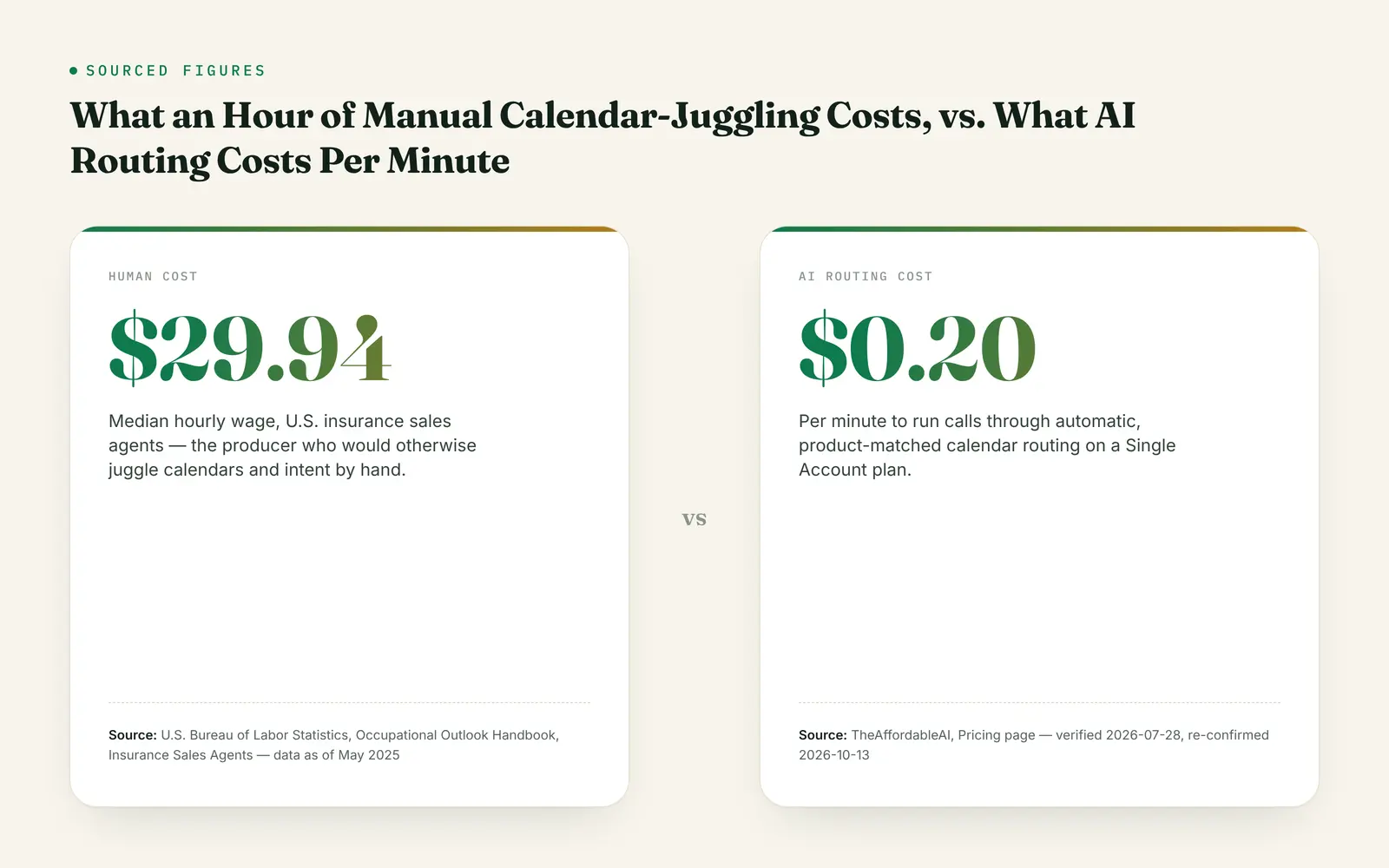
To put the two numbers on the same footing: $29.94 an hour works out to roughly $0.499 a minute of a producer’s time, a plain division of the sourced hourly figure, not a separate claim. Set against TheAffordableAI’s Single Account rate of $0.20 a minute, list, or $0.15 at bulk, per the pricing page, the gap is real, though it compares two different things: a producer’s loaded time against a calling rate, not a one-to-one swap. What it makes concrete is that cleanup minutes are priced at the higher number, which is the argument for not generating the cleanup work at all.
The math above uses $0.20 a minute because that’s what a Single Account costs. Run it with your own numbers. See current pricing.
The Medicare Wrinkle: Scope of Appointment and Calendar Choice
This is the part that turns a scheduling inconvenience into a compliance question, and it only applies to Medicare, not ACA, dental, or final expense bookings.
CMS’s Medicare Communications and Marketing Guidelines set out the Scope of Appointment requirement under 42 CFR §§422.2264(c), 422.2266(d)-(f), and 422.2274(b)-(c) (423.2264(c) and 423.2266(d)-(e) for Part D). The guidelines are specific about what has to be on the form or the recorded call, and about what happens mid-appointment if the conversation drifts:
| Requirement | What it means for calendar routing | Citation |
|---|---|---|
| Product types to be discussed | Must be named on the form or recorded call before the appointment starts, which means the calendar the appointment is booked on should match what was scoped | 42 CFR 422.2274(b) |
| Date of appointment | Tracked against the SOA record, not just the CRM's appointment timestamp | 42 CFR 422.2266(d) |
| Beneficiary and agent contact info | Standard identification fields, consistent with a normal CRM contact record | MCMG p.28 |
| No-obligation statement | Must state no obligation to enroll and that current enrollment status won't be affected | MCMG p.28 |
| New SOA if plan type changes | If the beneficiary asks about a different plan type mid-appointment, a new Scope of Appointment is required, though not a new appointment | MCMG p.28 |
Source: CMS, Medicare Communications and Marketing Guidelines (effective Feb. 9, 2022), p.28, Scope of Appointment (Communications) section; 42 CFR 422.2274, Cornell Law School Legal Information Institute, current through 91 FR 17583, Apr. 6, 2026.
Read that last row again against how most agencies actually route calendars. If a lead is scoped for Medicare Advantage and the conversation, or the calendar it was booked on, drifts into Medigap or Part D without a new scope being documented, that’s the exact scenario CMS’s guidance addresses. A calendar organized by product isn’t just a convenience for your team, it’s a structural prompt that keeps the appointment’s actual scope matched to what was agreed in advance. A single shared calendar has no such structure; the product boundary exists only in whatever the producer remembers from the intake notes.
Compliance, stated plainly
Using an AI caller or a CRM workflow to route calls and appointments does not transfer TCPA, DNC, or CMS compliance liability away from the licensed agent. Automated or prerecorded calls to a cell phone require prior express written consent for marketing under the TCPA, and that consent obligation is the agent's, not the vendor's. For Medicare specifically, CMS's Third Party Marketing Organization rules on recording, retention, and disclosure apply regardless of which calendar the appointment lands on. None of the routing logic in this article substitutes for a documented Scope of Appointment, a TPMO disclaimer, or an agent's own license-state verification.
How to Build Multi-Calendar Routing Yourself in GoHighLevel
This is the part worth giving away in full, because building it is genuinely within reach for an agency with an existing GoHighLevel account and no new software purchase.
Step 1: Build one calendar per product line. Not per producer, per product. A Medicare calendar, an ACA calendar, a dental calendar if you sell it, each with its own team members, availability windows, and booking page.
Step 2: Group them. Per HighLevel’s Group Calendar Overview and Setup Guide, create a Group Calendar and assign each individual calendar into it, organized by service. This is what lets a single entry point (a phone workflow, a web form, an AI caller) present the right option without exposing your entire team’s combined calendar to every lead regardless of product.
Step 3: Set round-robin inside each group, not across it. Within the Medicare calendar, use HighLevel’s round-robin distribution, Optimize for Availability if speed matters more than evenness, Optimize for Equal Distribution if fairness across producers matters more, per the platform’s own documented logic. Keep this decision separate from which calendar gets checked in the first place.
Step 4: Use the Unassigned Calendar type for the catch-all. HighLevel’s support documentation on Adding Unassigned Calendars to Groups confirms groups can include calendars of the Unassigned type alongside Round-Robin calendars. That combination is useful for a product line where intent is clear but no specific producer assignment has been made yet, a lead who needs a Medicare conversation but hasn’t been matched to a licensed producer in their state.
Step 5: Feed intent into the booking trigger. This is the step most agencies skip, and it’s a workflow problem, not a calendar problem. A contact’s product intent, tagged from the lead source, an intake question, or a stated need, needs to decide which calendar group a workflow routes the booking action to. Without this step, you have well-organized calendars and still no mechanism connecting a lead’s actual need to which one gets checked; see our trigger-to-warm-transfer workflow breakdown for how the trigger side of this typically gets built.
| Model | Decides | Fits multi-product agencies? | Common failure mode |
|---|---|---|---|
| Single shared calendar | Nothing; first available slot, regardless of product | No | Product mismatch discovered mid-call; manual rescheduling with no audit trail |
| Round-robin by agent only | Which producer, evenly or by availability | Only if every producer sells every product | Fair distribution of the wrong calendar; doesn't solve product mismatch |
| Multi-calendar intent routing | Which calendar first, by product, then which producer inside it | Yes | Intent misread at the top of the call; needs a reroute step as a fallback |
Compiled from HighLevel Support Portal documentation on Group Calendars, Unassigned Calendars, and Round Robin distribution logic, fetched 2026-10-13.
If you’re already on HighLevel, the sync between this routing logic and your contact records is the part most people ask about first. See how it works.
How TheAffordableAI Handles Multi-Calendar Routing
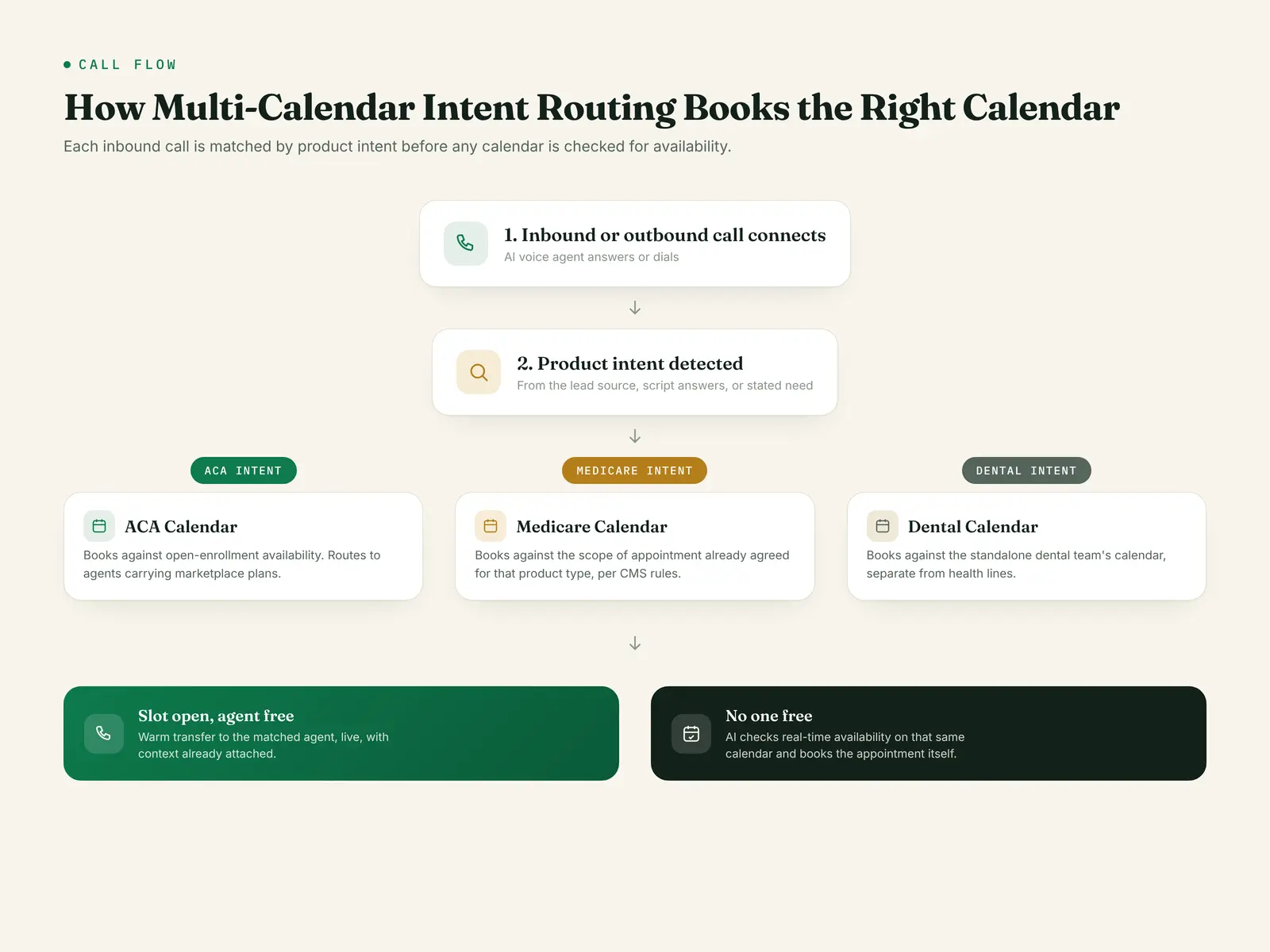
TheAffordableAI’s managed AI caller runs this exact mechanic natively, described on its own features and how-it-works pages: an ACA lead books to your ACA calendar, a Medicare lead to a Medicare calendar, and dental to its own, with the lead’s detected intent determining which calendar receives the appointment. When a lead qualifies, the AI rings 20 or more available agents simultaneously inside the matched calendar’s group, and whichever agent answers first gets the live caller with the qualifying context already attached. If nobody answers, the AI doesn’t drop the lead or leave it parked, it checks real-time availability on that same matched calendar and books the appointment itself.
Intent-matched calendars
Calls route by detected product intent to the calendar built for that line, not a single shared booking link.
Warm transfer, first to answer
Up to 20+ agents ring at once inside the matched calendar's group; the first to pick up gets the context already attached.
Auto-booking fallback
If nobody answers, the AI checks live availability on that same calendar and books the appointment directly, instead of leaving it unresolved.
Two-way HighLevel sync
Tags, custom fields, pipeline stage, transcript, and recording write back to the contact record natively, not through a webhook chain.
Number warmup included
Numbers are provisioned ahead of go-live because warmup takes a few weeks to reach full daily volume, so the calendar routing is live and the number can actually carry the calls.
No contracts
Single Account and Agency plans are both month to month; cancel anytime.
If you want to hear what this actually sounds like before you decide anything, there’s a demo call on the homepage. theaffordableai.com
The calendar a lead lands on is the first decision your intake process makes. Getting it wrong doesn't cost you the lead; it costs you the producer's next ten minutes, every time it happens.
What You Get
Done correctly, multi-calendar intent routing means a producer opens their calendar and every appointment on it is already the right conversation, with the right scope, for the product they’re licensed and prepared to sell. It means a Medicare appointment carries the Scope of Appointment that actually matches what’s being discussed, not a generic booking that happened to land in the right hour. And it means the manual rescheduling, the “wait, this is supposed to be about what?” moments, stop being a quiet tax on your most expensive hours.
None of this requires new software if you’re already running GoHighLevel. It requires building the calendars by product instead of by producer, grouping them, and feeding intent into the booking trigger, which is a workflow build an agency can do with existing tools. What an AI caller adds on top is the intent-detection step itself, reading what a lead actually wants from the call in real time, so the calendar selection happens automatically instead of depending on whoever answers the phone remembering to ask the right question first.
Frequently Asked Questions
What is multi-calendar intent routing?
How is this different from round-robin lead routing?
Does GoHighLevel actually support multiple calendars organized by product?
Does booking the wrong calendar create a Medicare compliance problem?
What happens when intent detection gets it wrong?
Can one AI caller really manage calendars across several product lines at once?
Do I need multi-calendar routing if my agency only sells one product line?
What's the fastest way to check if my current calendar setup already has this problem?
Sources
- TheAffordableAI — How It Works (fetched 2026-10-13)
- TheAffordableAI — Features (fetched 2026-10-13)
- TheAffordableAI — Pricing (fetched 2026-10-13)
- HighLevel Support Portal — Group Calendar Overview and Setup Guide
- HighLevel Support Portal — Adding Unassigned Calendars to Groups
- HighLevel Support Portal — Appointment Distribution Logic for Round Robin Calendars
- CMS — Medicare Communications and Marketing Guidelines (effective 2-9-2022), p.28
- Cornell Law School Legal Information Institute — 42 CFR 422.2274
- U.S. Bureau of Labor Statistics — Occupational Outlook Handbook, Insurance Sales Agents
See your own calendars routed by intent
No contracts either way, so the risk of trying it is one month. Pricing runs $200/mo plus a one-time $500 setup for a Single Account, or $500/mo plus $1,000 setup for Agency, both billed per minute with no long-term commitment.
Frequently asked
What is multi-calendar intent routing?
It's a setup where an AI caller or workflow reads what a lead actually wants, ACA, Medicare, dental, final expense, whatever product lines an agency carries, and books the appointment onto the calendar built for that product instead of a single shared calendar for everyone. TheAffordableAI's own features page describes the pattern directly: an ACA lead books to the ACA calendar, a Medicare lead to the Medicare calendar, and dental to its own. The routing decision happens before availability is even checked, because which calendar to check depends on what the lead needs, not just who's free.
How is this different from round-robin lead routing?
Round-robin and skill-based routing decide which producer gets a lead. Multi-calendar intent routing decides which calendar the appointment lands on in the first place, which is a separate decision that happens first. An agency can run round-robin assignment inside a single Medicare calendar group and still have no answer for what happens when the same number also takes ACA and final expense calls. The two problems compound: get the calendar wrong and even a perfect round-robin just distributes the mistake evenly across your team.
Does GoHighLevel actually support multiple calendars organized by product?
Yes. HighLevel's own Group Calendar Overview and Setup Guide describes a Group Calendar as a container that groups multiple individual calendars under one link, organized by department, availability, or service, so a booking link can let a caller or workflow choose between team members or services. You build each individual calendar first, then assign it into a group. A separate support article confirms groups can now be assigned to the Unassigned Calendar type as well as Round-Robin calendars, which is the mechanism that lets a product-specific calendar also distribute fairly across the producers who sell that product.
Does booking the wrong calendar create a Medicare compliance problem?
It can, and this is the piece agencies miss. CMS's Medicare Communications and Marketing Guidelines require a Scope of Appointment to list the product types to be discussed, and state plainly that a new Scope of Appointment is required if the beneficiary requests information about a different plan type than previously agreed upon. If your Medicare calendar is the one place that's supposed to reflect what was actually scoped, and a routing error books a Medicare Advantage conversation onto a calendar meant for a different product, the paperwork and the conversation stop matching. That's a documentation gap CMS can flag, independent of anything the agent said on the call.
What happens when intent detection gets it wrong?
The honest answer is that it will happen sometimes, with any routing method, human or AI. The design question is what the fallback looks like. A well-built multi-calendar setup gives the AI caller, or the human intake step, a way to reroute mid-call once the real need becomes clear, rather than letting the appointment sit on the wrong calendar until someone notices at the actual meeting. If your system has no reroute step, that's the gap to fix before adding more calendars, not a reason to avoid multi-calendar routing.
Can one AI caller really manage calendars across several product lines at once?
That's the specific claim worth checking before you believe it. TheAffordableAI's how-it-works page states that an ACA lead books to your ACA calendar, a Medicare lead to a Medicare calendar, and dental to its own, with the lead's detected intent determining which calendar receives the appointment, and that if nobody answers a warm transfer, the AI checks live availability on that same matched calendar and books it directly. The mechanism is intent detection feeding a calendar selection, then a normal availability check against whichever calendar was selected, not a single undifferentiated calendar with a label on it.
Do I need multi-calendar routing if my agency only sells one product line?
No. This entire problem exists because more than one product, and usually more than one producer, are sharing one intake process. A solo final-expense-only agent has no routing decision to make; every lead needs the same calendar. The moment a second product line or a second licensed line of authority enters the picture, usually a producer who's Medicare and ACA dual-licensed, is when a single shared calendar starts silently merging two things that should have stayed separate.
What's the fastest way to check if my current calendar setup already has this problem?
Pull your last 30 days of booked appointments and check two things: how many calendars currently exist for how many product lines you actually sell, and how many of those appointments had to be manually moved, rescheduled to a different calendar, or re-scoped before the actual meeting happened. If you're running one calendar across ACA, Medicare, and anything else, or if reroutes are a regular occurrence nobody's tracking, that's the signal, not a hunch.
Sources
- TheAffordableAI — How It Works (fetched 2026-10-13)
- TheAffordableAI — Features (fetched 2026-10-13)
- TheAffordableAI — Pricing (fetched 2026-10-13)
- HighLevel Support Portal — Group Calendar Overview and Setup Guide
- HighLevel Support Portal — Adding Unassigned Calendars to Groups
- HighLevel Support Portal — Appointment Distribution Logic for Round Robin Calendars
- CMS — Medicare Communications and Marketing Guidelines (effective 2-9-2022), Scope of Appointment requirements, p.28
- Cornell Law School Legal Information Institute — 42 CFR 422.2274, Agent, broker, and other third-party requirements (current through 91 FR 17583, Apr. 6, 2026)
- U.S. Bureau of Labor Statistics — Occupational Outlook Handbook, Insurance Sales Agents (wage data May 2025, employment 2025)
Put this on your own phone line
See the AI dial, qualify, and warm-transfer a live call in under a minute. No contract, no dev work.
Keep reading

GoHighLevel Insurance Workflows: Trigger to Warm Transfer
Most GoHighLevel insurance workflows stop at 'assign the lead.' Here's the trigger-to-warm-transfer build, GHL's own docs, and where TCPA rules bite.

Insurance Lead Routing: Round-Robin vs Skill-Based
Round-robin, skill-based, and first-to-answer routing compared for insurance agencies: how each works, what breaks, and how to build a fair one in 2026.

CMS 2027 Medicare Rules: The 48-Hour Wait Is Gone
CMS eliminated the 48-hour Scope of Appointment wait, changed the TPMO disclaimer timing, and cut call retention to 6 years ahead of AEP 2027.