Insurance Lead Disposition Codes: Why Leads Go Dark
Your CRM shows 340 leads marked 'Contacted' with no next step. Here's why disposition codes break, what it costs in TCPA exposure, and the fix.

A lead disposition code is the outcome label a CRM reads to decide what happens next after a call: redial, escalate, nurture, or stop contacting entirely. Leads go dark when that label is missing, wrong, or stale, because most pipeline automation doesn’t act on notes, voicemail transcripts, or gut feel. It acts on the disposition field, and nothing else. If that field says nothing, the automation does nothing, and a lead that’s still very much alive looks, to every system touching it, exactly like one that’s dead.
This piece covers why that gap opens up in a real agency, what it actually costs when it does, a full disposition taxonomy you can build today with no new software, how to wire it into GoHighLevel specifically, and where a managed AI caller closes the gap that a busy human reliably leaves open.
The short version
- A disposition code is the field your CRM's automation actually reads to decide what happens next. A note in the comments field isn't one. "Contacted" with nothing else isn't one either.
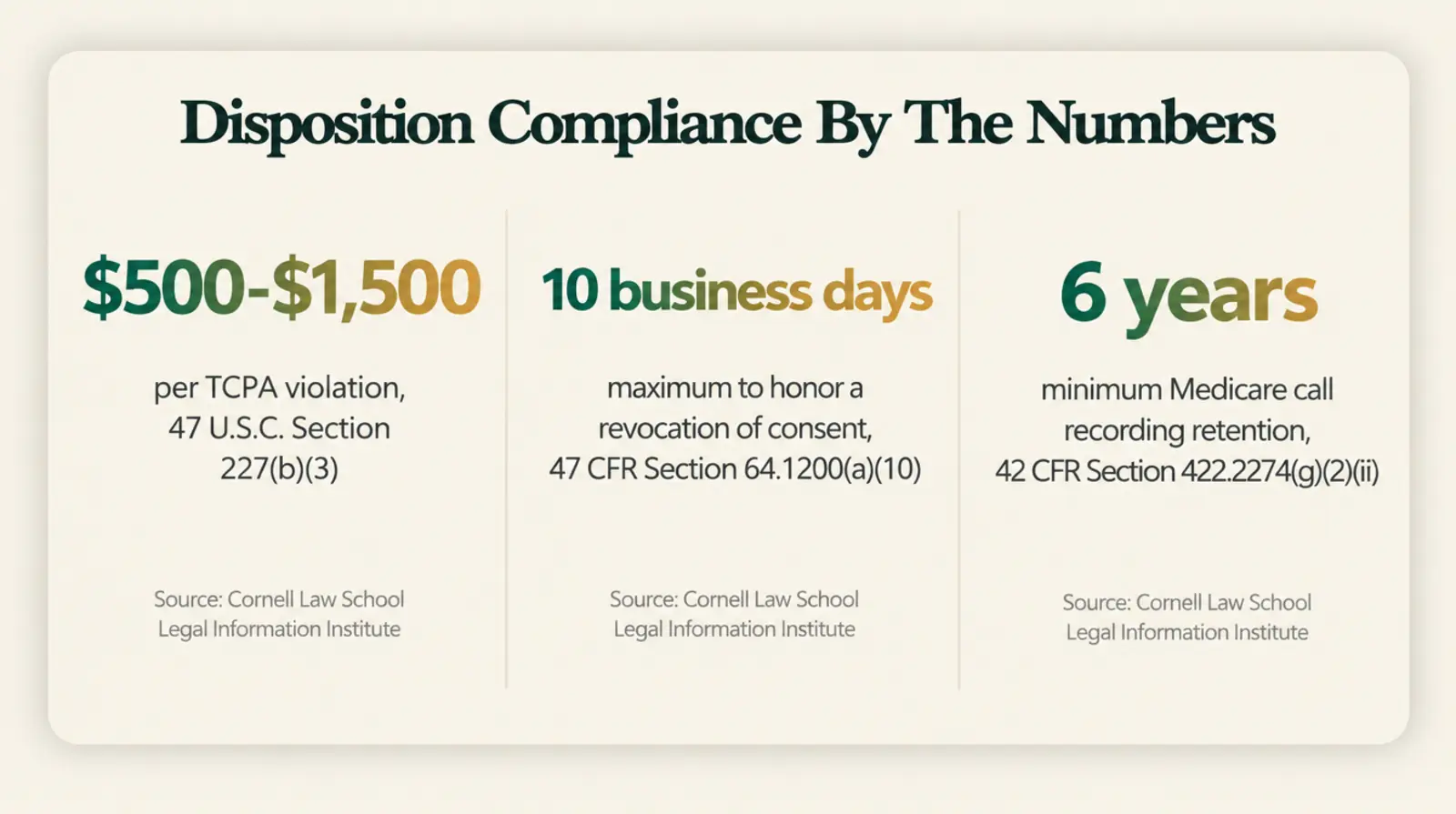
- Under 47 CFR Section 64.1200(a)(10), a revocation of consent must be honored within a reasonable time, capped at ten business days, and a business can't force the consumer onto one specific channel to make it. If "stop calling me" never becomes a disposition, every later call is a fresh violation at $500 to $1,500 under 47 U.S.C. Section 227(b)(3).
- GoHighLevel ships the pieces (Opportunity Status Changed, Pipeline Stage Changed, and Stale Opportunities triggers, a Lost Reason field) but not an assembled disposition system. An agency has to build the taxonomy and wire it in.
- The fix is a short, enforced list of disposition codes, each one mapped to exactly one automated action, audited on a schedule. None of it requires new software.
- A separate obligation, Medicare call-recording retention under 42 CFR Section 422.2274(g)(2)(ii), now runs 6 years, not 10. That doesn't replace a disposition system; it's a different record for a different purpose.
The Pain: “Contacted” Isn’t a Disposition, It’s a Shrug
Pull a CRM report on any agency running real volume and you’ll find this same pile: a stack of leads marked “Contacted,” “Working,” or nothing at all, with no note, no next action, no date to try again. Ask the agent who touched them and you’ll get some version of the same answer: they got busy, the call didn’t go anywhere obvious, and they moved to the next dial rather than stop and decide which of six dropdown options best described a thirty-second non-conversation.
On Insurance-Forums.com, a thread titled “Lead Dispositions” has agents describing their own informal shorthand for exactly this problem: codes like NIH (not interested in the home), NID (no presentation made), NH (not home), and FUAM (follow up in the morning). None of that is a standard, and it varies agency to agency, sometimes desk to desk. What it tells you is that agents already know they need some way to mark an outcome. What most agencies never build is the second half: a rule that says what the system does automatically once that mark is applied.
Here’s the part that costs money. Your pipeline report, the one a manager glances at before a Monday call, counts a lead marked “Contacted” the same as a lead that was genuinely worked and is waiting on a callback. It has no way to distinguish “I called, nobody picked up, and I’m trying again tomorrow at 2pm” from “I called, I have no idea what happened, and I’m never touching this record again.” Both look identical on the board. Only one of them is actually still in motion.
Why It Happens: Three Fields That Aren’t the Same Thing
Most of the confusion starts because three different pieces of a CRM get treated as interchangeable when they’re not.
Pipeline stage is where a lead sits in your sales process: New, Contacted, Quoted, Sold, Lost. It describes position, not outcome.
Opportunity status is a broader flag, usually Open, Won, Lost, or Abandoned, that GoHighLevel and most CRMs use to close out a record entirely.
Disposition code is the specific result of one contact attempt: no answer, voicemail left, requested callback, revoked consent, wrong number. It’s the only one of the three that’s granular enough to drive a decision about the very next action.
A lead can sit in the “Contacted” stage, show an “Open” status, and still have zero usable disposition information, which is exactly the gap that lets it go dark. The stage and status fields answer “where is this lead in the process.” Only the disposition answers “what should happen to it right now,” and if nobody’s required to fill that one in, nobody reliably does.
Define the terms before you build anything
Disposition code: the outcome label applied after one specific contact attempt, read by automation to decide the next action. Pipeline stage: a lead's position in the sales process (New, Contacted, Quoted, Sold). Opportunity status: a broader open/won/lost/abandoned flag used to close a record out entirely. Lost reason: the specific disposition applied when an opportunity is marked lost, settable directly in GoHighLevel's Create Opportunity action. Revoked consent: a prospect's request to stop being contacted, which under 47 CFR Section 64.1200(a)(10) must be honored within a reasonable time, capped at ten business days, through whatever reasonable channel they used to ask. Round robin: distributing leads across multiple agents in rotation rather than to one person by default.
Three specific failure patterns show up over and over once an agency is actually looking:
The field isn’t required, so it gets skipped under time pressure. If a CRM lets a call get logged with no disposition set, a busy agent during AEP or open enrollment will do exactly that, every time the choice is between filling out a dropdown and getting to the next dial faster.
Multiple hands touch the same lead with no shared standard. A human agent, an outsourced VA, and an AI caller working the same list often don’t use the same codes, or use the same code to mean different things. A VA’s “not ready” and an agent’s “call back later” might be functionally the same disposition wearing two different labels, which breaks any automation built to watch for one specific value.
Nobody audits the undispositioned pile. GoHighLevel’s own support documentation describes a Stale Opportunities trigger built for exactly this: it can find opportunities with no change for a set number of days. It only works if a workflow is actually configured to use it. Most agencies that have GoHighLevel have never turned that specific trigger on.
What It Costs When a Disposition Is Missing or Wrong
Two different costs stack here, and only one of them shows up on a P&L.
The first is compliance exposure, and it’s the sharper edge. The moment a prospect revokes consent, by saying “stop calling me” on a live call, replying STOP to a text, or any other reasonable method, the clock starts. Per Cornell Law School’s Legal Information Institute’s text of 47 CFR Section 64.1200(a)(10), the business must honor that revocation “within a reasonable time not to exceed ten business days from receipt of such request,” and cannot designate one exclusive channel the consumer is required to use. If that revocation never gets captured as a disposition, because the agent who heard it was mid-call and moved on, or because the CRM has no “revoked/DNC” code at all, the lead stays live in every automated sequence touching it. The next autodialed or AI-placed call isn’t a mistake in the abstract. Under 47 U.S.C. Section 227(b)(3), per the same source, it’s a fresh violation carrying $500 in statutory damages, or up to $1,500 if a court finds it willful or knowing, and that’s per call, regardless of whether anything ever came of it.
What one mis-dispositioned "stop calling me" can cost per call
TCPA statutory damages, 47 U.S.C. Section 227(b)(3)
Source: 47 U.S.C. Section 227(b)(3), via Cornell Law School's Legal Information Institute. Figures are per violation, meaning per call or text to that number, not per campaign, and apply regardless of whether the call was answered or led to a sale.
The second cost is quieter: wasted calling minutes on leads whose real status nobody can actually see. This one won’t show up as a lawsuit, but it’s real money at your own published rate, and you can run it yourself.
| Active leads in the CRM | 10% with no usable disposition | Wasted minutes (3 min/call) | Cost at $0.20/min (Single) | Cost at $0.16/min (Agency, bulk) |
|---|---|---|---|---|
| 500 | 50 | 150 | $30.00 | $24.00 |
| 2,000 | 200 | 600 | $120.00 | $96.00 |
| 10,000 | 1,000 | 3,000 | $600.00 | $480.00 |
Source: TheAffordableAI, Pricing (verified November 2, 2026), Single Account $0.20/min list rate and Agency $0.16/min bulk rate. The 10% undispositioned share and 3-minute average call length are illustrative assumptions for this worked example, not a published industry statistic; substitute your own CRM's actual undispositioned count and average call length to get your real number.
That table is deliberately conservative, too. It only prices redial minutes on leads nobody can confirm the status of. It doesn’t count the cost of an agent’s own time spent guessing, the revenue sitting in a lead that was actually ready to buy and got abandoned because its disposition looked identical to a dead one, or the legal exposure covered above. Run your own CRM’s real undispositioned count through the same math and the number only grows.
The Full Disposition Taxonomy: Give It Away
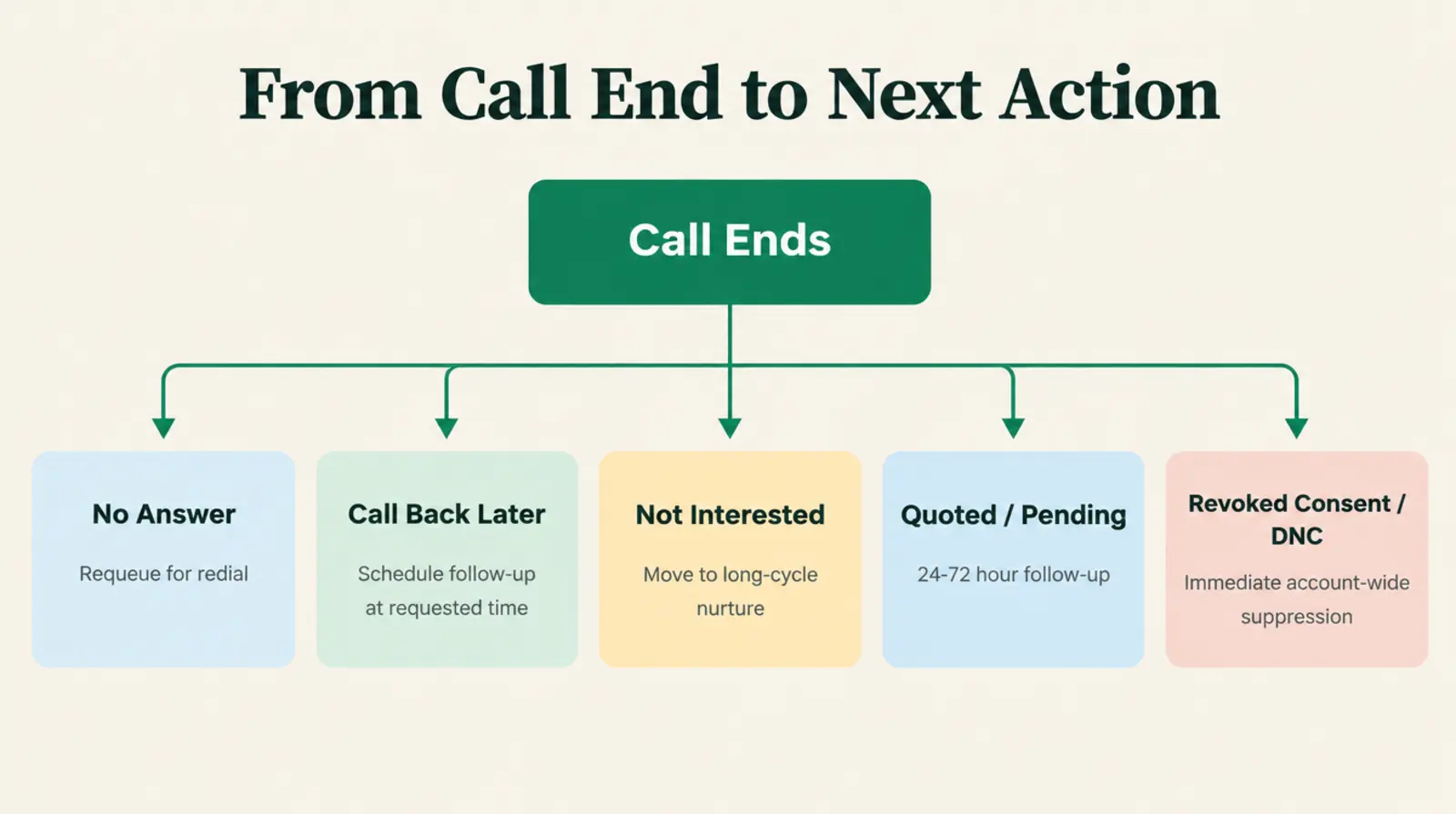
This is the part most vendor content skips, because a short, enforced taxonomy is the entire fix and it costs nothing to build. Eight codes cover almost every real outcome of an insurance sales call, and each one maps to exactly one automated action, not a judgment call.
| Disposition | Applied when | Automated action it should trigger |
|---|---|---|
| No answer | Call rang with no pickup, no voicemail left | Requeue for redial on the standard cadence; no human review needed |
| Voicemail left | Call reached voicemail and a message was left | Start or continue the SMS/email nurture sequence alongside the redial cadence |
| Bad number | Disconnected line, wrong person confirmed, fax/business line | Flag for data cleanup; suppress further dials to that number specifically |
| Call back later | Prospect spoke to you and asked for a specific later time | Schedule exactly one follow-up at the requested date/time; no generic cadence |
| Not interested | Prospect declined, no request to stop contact entirely | Move to a long-cycle nurture track (e.g., quarterly), not immediate removal |
| Quoted / pending decision | A quote or application was presented and the prospect is deciding | Short, tight follow-up cadence (24 to 72 hours) owned by one named agent |
| Sold / won | Policy issued or application submitted and accepted | Close the opportunity; enter the client onto a retention/renewal track, not the sales cadence |
| Revoked consent / DNC | Prospect asked, by any reasonable means, to stop being contacted | Immediate, account-wide contact suppression across every channel and every campaign, honored inside the ten-business-day window required by 47 CFR Section 64.1200(a)(10) |
The Revoked consent / DNC row's compliance window is sourced to Cornell Law School's Legal Information Institute's text of 47 CFR Section 64.1200(a)(10). The other seven rows describe a working operational framework, not a regulatory requirement.
Two rules make this list actually hold up under real volume. First, the disposition field is required to close out a call record at all; if the CRM lets a call get saved without one, someone eventually will. Second, “revoked consent / DNC” is never optional and never gets downgraded to “not interested,” because the two have completely different legal weight even though they sound similar out of an agent’s mouth in the moment.
Wiring It Into GoHighLevel Without New Software
GoHighLevel already ships the mechanical pieces this needs; nobody assembles them into a system by default. Per GoHighLevel’s own support documentation on automating opportunities, here’s the build:
- Add the eight dispositions as a custom field or tag set on the Opportunity object, not buried in a free-text notes field where no workflow can read it.
- Make the field required at call close. If your dialer or call-logging step lets a record save with it blank, fix that first; every other step depends on this one.
- Build an Opportunity Status Changed workflow for the two statuses that end an opportunity: Won and Lost. GoHighLevel’s Create Opportunity action can set the Lost Reason directly, so “Sold/won” and “Revoked consent/DNC” each close the record with a reason attached, not just a status flip.
- Build a Pipeline Stage Changed workflow for “Call back later” and “Quoted/pending decision” that schedules the specific follow-up task or date tied to that disposition, rather than dropping the lead into a generic sequence.
- Turn on the Stale Opportunities trigger and point it at a manager-visible alert for any opportunity with no disposition change inside your agency’s own stated follow-up window. This is the single step most agencies skip, and it’s the one that catches leads before they go fully dark.
- Route “Revoked consent/DNC” to a suppression workflow that touches every channel, calling, texting, and email, not just the one the request came in on, since the rule bars you from limiting revocation to one channel in the first place.
- Audit weekly during AEP or open enrollment, monthly otherwise. Pull every record with no disposition, every record stuck past your stated cadence, and every disposition one specific agent applies at an outlier rate.
You can build this exact system without buying anything
Every piece above exists inside GoHighLevel's standard workflow builder. An agency with a few hours to configure eight fields, two or three workflows, and one recurring saved filter gets the entire fix described in this piece at no additional software cost. The part that tends to fail isn't the build. It's keeping the disposition field required and enforced once call volume goes up and the person closing out calls is under pressure to move fast.
Where TheAffordableAI Fits, and Where It Doesn’t
Be precise here. A disposition taxonomy and the GoHighLevel workflows behind it are something any agency can build with the steps above and no vendor at all. If you’ve already wired a trigger-to-warm-transfer workflow following the GoHighLevel setup covered here, this piece is the layer that makes the dispositions feeding that workflow trustworthy in the first place. What a managed AI caller changes is whether the required step actually happens on every single call, every time, including the three thousandth call during AEP when a human would be most tempted to skip it. The full list of what’s included on a managed calling plan, the HighLevel sync piece specifically, is on the features page if you want the complete rundown rather than the summary below.
A disposition logged on every call, no exceptions
Closing out a call isn't optional or skippable under time pressure; the AI caller logs an outcome as a required step, not a dropdown it can leave blank to move faster.
Native HighLevel sync, not a manual export
The disposition, transcript, and tag write to the contact record the moment the call ends, so the workflows described above have real data to act on immediately, not at end of day.
Revoked consent handled as its own path
A request to stop contact gets tagged distinctly from a routine "not interested," and suppression applies account-wide rather than relying on one agent to remember to flag it everywhere.
Warm transfers and auto-booking on the "interested" paths
A "call back later" or "quoted" disposition can hand straight to a warm transfer or a booked slot against real calendar availability, instead of waiting for a human to notice the tag.
No contract, cancel anytime
Single Account runs $200/mo plus a $500 one-time setup at $0.20/min; Agency runs $500/mo plus a $1,000 one-time setup at $0.18/min, dropping to $0.16 at bulk. Price a month of consistent dispositioning against what one missed revoked-consent flag could cost in exposure alone.
If you want to hear what an actual call, and the disposition it produces, sounds like before deciding anything, there’s a live demo on the homepage. https://theaffordableai.com/
What You Actually Get
A pipeline report stops being a pile of identical-looking “Contacted” cards hiding two completely different realities: leads genuinely still in motion and leads nobody has touched in weeks. Every call ends with an outcome the system can act on immediately, not a note a manager has to read individually to understand. A revoked-consent request stops riding on one agent’s memory to get flagged everywhere it needs to. None of that manufactures interest that wasn’t there. It just makes sure the interest, or the lack of it, that a call actually produced doesn’t vanish the moment the call ends.
Shrug-Tagged vs. Disposition-Clean
One field, no enforcement
- Calls can close out with no disposition set at all
- "Contacted" covers everything from a live conversation to total silence
- A verbal "stop calling me" lives in a note nobody automated anything against
- Nobody can tell, from the board, which leads are actually still moving
Required field, mapped automations
- A call can't close without one of eight defined outcomes applied
- Each disposition triggers exactly one automated next step, not a guess
- Revoked consent suppresses contact account-wide inside the compliance window
- A weekly audit catches anything stuck or missing before it goes dark
A Worked Example: Two Versions of the Same AEP Week
Picture an agency running 1,200 outbound dials across a Monday-through-Friday AEP week, split between two human agents and an outsourced VA. On the shrug-tagged path, each caller uses their own shorthand. One agent marks everything “Contacted” regardless of outcome because the dropdown has too many options to think about between dials. The VA uses a different tag set entirely, inherited from a previous client. Three prospects tell the VA to stop calling over the course of the week; the VA writes “DNC” in a free-text notes field that no workflow reads. By Friday, the manager pulls the pipeline report and sees 1,200 touched leads with no way to tell which 40 are genuinely warm, which 300 are dead, and which three are now sitting in active TCPA exposure because the suppression never fired.
On the disposition-clean path, the same 1,200 dials each close with one of the eight defined outcomes, enforced as a required field regardless of who or what made the call. The three “stop calling me” requests hit the Revoked Consent/DNC code immediately, which suppresses every channel for those contacts inside the window the rule requires, no exceptions, no dependence on someone remembering to flag it manually elsewhere. The Friday pipeline report shows exactly 40 leads in “call back later” with a specific date attached, 22 in “quoted/pending decision” on a 48-hour follow-up, and a clean suppression list the manager can actually verify. Same 1,200 dials. One week ends with real, actionable data. The other ends with a report that looks full of activity and tells you almost nothing true.
Where This Is the Wrong Tool
A disposition system, built well and enforced perfectly, doesn’t fix a lead list that was never any good, and it doesn’t turn a genuinely uninterested prospect into a sale. If leads are going cold before anyone even gets to a disposition, the deeper problem may be the cadence itself, covered in the follow-up cadence piece, or how leads get assigned in the first place, covered in the lead routing piece. If your real problem is lead quality, not follow-up tracking, a clean taxonomy will just make it faster and clearer that the leads were the issue all along, which is still useful information, but it’s a different fix than the one this piece covers. And if your agency runs ten or fifteen calls a week total, the overhead of building and auditing eight codes and five workflows may genuinely cost more attention than it returns; at that volume, a shared spreadsheet with four honest columns gets most of the benefit for free.
Your CRM isn't reading your notes. It's reading one field, and if that field says nothing, the lead that's still alive looks exactly like the one that's dead.
Mike MooreUsing AI does not transfer this responsibility away from you
Consent, disclosure, honoring a revocation within the window required by 47 CFR Section 64.1200(a)(10), and National Do Not Call Registry obligations stay the responsibility of the licensed agent and agency, whether a human or an AI caller places the call or logs the disposition. A well-built disposition system makes compliance easier to prove; it doesn't move the underlying obligation anywhere else. If any part of your book touches Medicare Advantage or Part D marketing, the separate call-recording and six-year retention requirement under 42 CFR Section 422.2274(g)(2)(ii) still applies on top of everything in this piece. This is general information, not legal advice; confirm your specific obligations with your own compliance counsel.
Stop losing leads to a blank field
See what a managed caller that logs a disposition on every call, synced to HighLevel automatically, costs against your own undispositioned pile. No contract either way, so trying it one month is the entire risk.
The leads sitting in your pipeline marked “Contacted” with nothing else attached aren’t necessarily dead. Most of them are just waiting for a field nobody required anyone to fill in. Fix that field before you fix anything else about how your agency follows up.
Frequently asked
What is a lead disposition code, and why does it matter for insurance follow-up?
A disposition code is the outcome label attached to a lead after a specific contact attempt: no answer, left voicemail, not interested, call back later, quoted, revoked consent, wrong number, and so on. It matters because most CRM automation doesn't actually read your notes. It reads the disposition field and decides what happens next from it: whether the lead gets requeued for another dial, routed to a different agent, dropped into a nurture sequence, or suppressed from contact entirely. A lead with no disposition, or the wrong one, gives the automation nothing to act on, so by default it does nothing. The lead doesn't look lost in a report. It just sits there, indistinguishable from one that's actively being worked.
What disposition codes should an insurance agency actually use?
Enough to separate every action the next step depends on, and no more than a human or an AI caller can apply consistently on every single call. A workable starting set covers eight outcomes: no answer, left voicemail, bad number, call back later (with a required date/time), not interested, quoted/pending decision, sold/won, and revoked consent or do not call. The full taxonomy, with what each one should trigger, is laid out in the table further down this piece. Agencies that build a 20-code system almost always end up with agents picking whichever one is closest and moving on, which defeats the purpose.
What happens to a lead that never gets a disposition at all?
It depends entirely on what your CRM's default behavior is, and most agencies have never checked. In GoHighLevel, an opportunity with no disposition and no stage change typically just sits in whatever pipeline stage it landed in. There's a built-in Stale Opportunities trigger that can catch this, per GoHighLevel's own support documentation, but it only fires if someone configured a workflow to watch for it. Without that workflow, an undispositioned lead doesn't get flagged, doesn't get escalated, and doesn't get redialed. It's not marked dead. It's not marked alive. It just stops moving, and nothing in the system tells anyone that happened.
How does a missing or wrong disposition create TCPA exposure?
The clearest failure mode is a revoked-consent or do-not-call request that never gets captured as a disposition. Under 47 CFR Section 64.1200(a)(10), per Cornell Law School's Legal Information Institute, a business must honor a revocation request within a reasonable time, capped at ten business days, and cannot require the consumer to use one specific channel to make it. If a prospect tells a human agent 'stop calling me' on a live call and that never gets logged as a disposition, anything that dials them again, a human, an AI caller, or an automated text, is a fresh violation. Under 47 U.S.C. Section 227(b)(3), a consumer can recover $500 in statutory damages per violation, or up to $1,500 if a court finds the violation was willful or knowing. That's per call, not per campaign, and it applies whether or not the call ever led anywhere.
Does GoHighLevel track dispositions automatically, or do you have to build it?
You have to build it, though the pieces already exist. GoHighLevel's own support documentation describes an Opportunity Status Changed trigger and a Pipeline Stage Changed trigger that can fire a workflow off a status or stage change, plus a Lost Reason field that a Create Opportunity action can set directly. None of that is wired together as a disposition system out of the box. It's a set of building blocks an agency has to assemble into a taxonomy, map to automations, and actually enforce as a required field on every call outcome, which is exactly the part that tends to not happen once volume picks up.
Can an AI caller log dispositions more reliably than a human agent?
It can apply one consistently, every single time, because it isn't making a judgment call under time pressure between dials. A human agent who's rushing to the next call, or juggling three browser tabs during AEP, is the person who skips the disposition field or picks whichever option is closest. An AI caller that's built to log a disposition as a required step at the end of every call doesn't have that failure mode; it either completes the step or the call isn't closed out. That doesn't make the taxonomy itself better. A bad taxonomy applied perfectly is still a bad taxonomy. It does remove the most common reason a good taxonomy stops being followed.
How often should an agency audit its disposition data?
Weekly, at minimum, during any high-volume period like AEP or open enrollment, and monthly otherwise. The audit is simple: pull every lead with no disposition, every lead stuck in the same disposition for longer than your own stated follow-up cadence, and every disposition applied by a specific agent at an unusually high rate compared to the rest of the team, since that's often a sign of someone defaulting to one code to clear their queue faster. None of this requires new software. It requires someone running the same saved CRM filter on a schedule and actually looking at what comes back.
Does a clean disposition system replace the Medicare call-recording retention requirement?
No, they're separate obligations that happen to touch the same call. Under 42 CFR Section 422.2274(g)(2)(ii), per Cornell Law School's Legal Information Institute, Medicare Advantage and Part D marketing and sales calls must be recorded and retained for a minimum of six years, with the first three years kept in audio format. A disposition code tells your CRM what to do next; the recording and retention requirement is about preserving the call itself for CMS to review on request. An agency needs both: a disposition that routes the lead correctly today, and a retained recording that can answer a compliance question years later. This piece covers the Medicare retention change in full.
Sources
- Cornell Law School Legal Information Institute — 47 U.S.C. Section 227, Telephone Consumer Protection Act (statutory damages, Section 227(b)(3))
- Cornell Law School Legal Information Institute — 47 CFR Section 64.1200, Delivery Restrictions (revocation of consent, Section 64.1200(a)(10))
- Cornell Law School Legal Information Institute — 42 CFR Section 422.2274, Medicare Advantage agent, broker, and third-party requirements (call recording retention, Section 422.2274(g)(2)(ii))
- GoHighLevel Support — Automating Opportunities (Opportunity Status Changed, Pipeline Stage Changed, and Stale Opportunities triggers; Lost Reason field)
- Insurance-Forums.com — 'Lead Dispositions' (agent discussion thread on disposition practices and codes)
- TheAffordableAI — Pricing (verified November 2, 2026)
- TheAffordableAI — Features
Put this on your own phone line
See the AI dial, qualify, and warm-transfer a live call in under a minute. No contract, no dev work.
Keep reading

GoHighLevel Insurance Workflows: Trigger to Warm Transfer
Most GoHighLevel insurance workflows stop at 'assign the lead.' Here's the trigger-to-warm-transfer build, GHL's own docs, and where TCPA rules bite.

Insurance Lead Routing: Round-Robin vs Skill-Based
Round-robin, skill-based, and first-to-answer routing compared for insurance agencies: how each works, what breaks, and how to build a fair one in 2026.

TCPA Revoke-All Rule 2026: What the FCC Just Adopted
The FCC adopted a new TCPA revocation order on September 30, 2026, months ahead of the 2027 deadline. Here is what changed for insurance agents.